Connect an agent to your intended Energon and verify the account before publishing. Use that host’s installation and authentication instructions because its skill name, origin, token environment, and supported connection flow can differ from another deployment. A signed-in human approves access; the agent receives a token only after that approval.
Connect an agent
What you need
You need the hub origin and permission to sign in through its Cloudflare Access policy. If no Energon exists, follow Deploy an Energon host first. The upstream repository contains templates, with no installable skill or marketplace catalogs; your operator must initialize the deployment repository before distributing the skill.
1. Install the Energon agent skill
Open the hub’s /setup page and copy its filled installation instructions into your agent. What you install is this Energon’s agent skill. The deployment repository packages it as a named plugin on a GitHub marketplace; the plugin is the distribution detail, not a separate product.
The shortest path is the Skills CLI, which installs the same skill across compatible agents. Use --skill so you install this Energon’s publish skill, not the operator skills from the same repo. Use the filled repo and skill names from /setup, not this example. Install at user or global scope unless your repository calls for project scope.
npx skills add your-org/energon --skill yourco-energon -gOr add that repo as a plugin marketplace, then install the named plugin with your agent’s plugin flow.
Skills CLI
npx skills add your-org/energon --skill yourco-energon -gAn installed plugin does not update itself when this Energon ships a release. After the operator publishes the new plugin, run your client’s update, such as npx skills update yourco-energon -g or claude plugin marketplace update followed by claude plugin update. See Refresh an installed plugin for each client.
Private repositories
The agent tool needs GitHub read access to the deployment repository, including for plugin updates. This credential is separate from the Energon agent key. Use your tool’s supported GitHub authentication, an existing Git credential helper, or SSH identity; organization SSO may also require authorization. Never put repository credentials in a URL, prompt, plugin, or committed settings.
Check access from the same environment that installs the plugin, using the repository named by /setup:
git ls-remote https://github.com/your-org/energon.git HEADA private repository may return 404 when permission is missing. Request access and retry; do not make the repository public. A successful GitHub CLI login alone does not prove the agent tool can clone it.
If the tool cannot install a private marketplace but supports local skills, clone the repository with authenticated Git and install only plugins/{plugin}/skills/{skill}/ through the tool’s local-skill mechanism. Preserve its references, install at user scope, and record the source commit for later refreshes. Do not install every skill in the repository: the operator skills manage releases and deployment. Verify that the client actually loaded this Energon’s generated publish skill.
If neither plugin nor local-skill installation works, install the skill from this Energon’s well-known URL; see Install from this Energon without repository access. If skills are unavailable in the tool altogether, the agent can use /v1/help, /llms.txt, and /auth.md with human-approved API access. Both work without GitHub access; report plugin installation as unavailable. See the checkout’s Private repository access instructions for the canonical procedure.
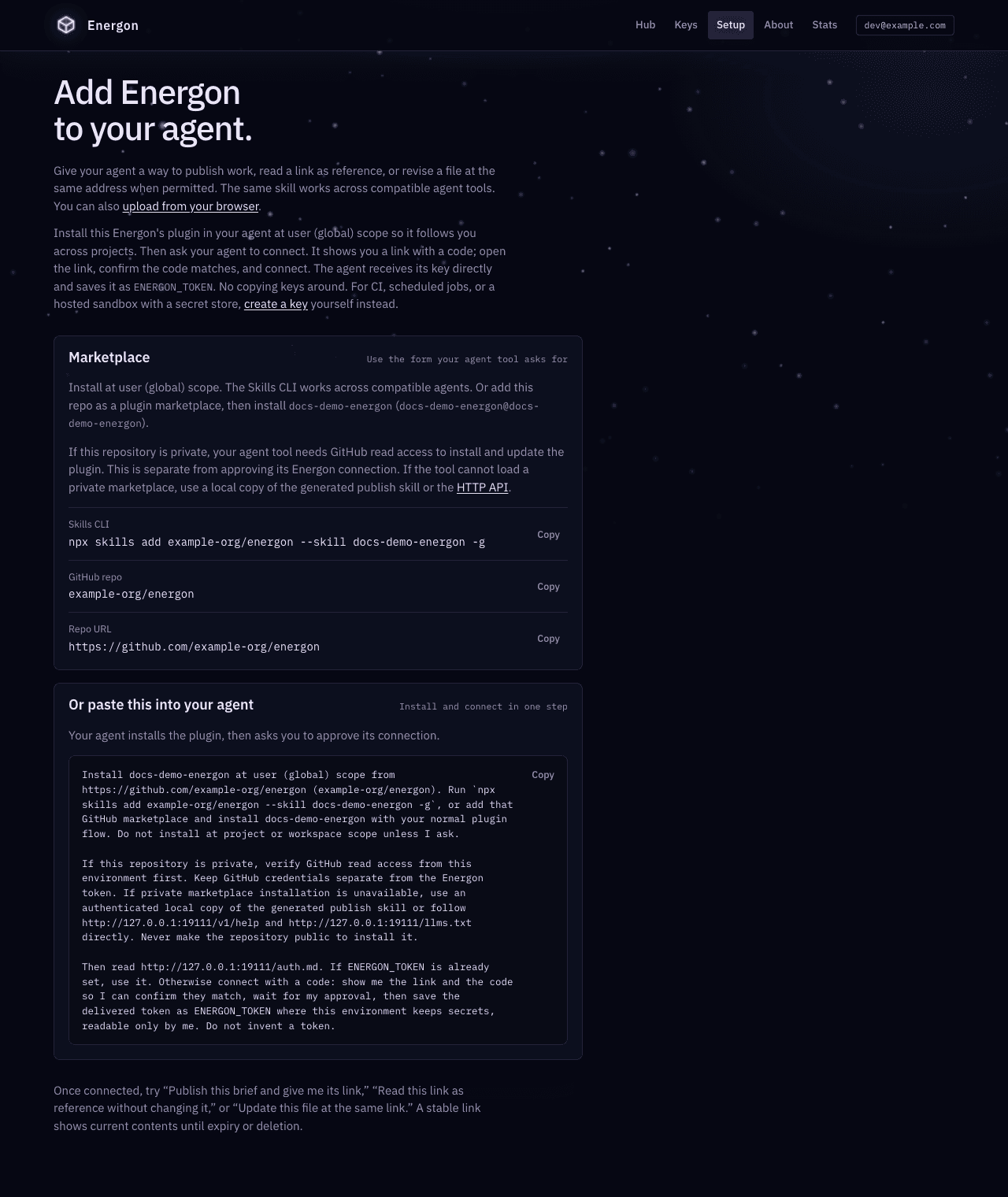
The screenshots on this page use a disposable local Energon. Its example marketplace coordinates illustrate the interface; install only from your own host’s filled instructions.
When Setup is unavailable, ask the agent to read the public /v1/help response for identity.repo, identity.install, identity.env, and agent_skills_url. /auth.md describes authentication and recovery on hosts that support it:
HUB_ORIGIN=https://energon.company.example
curl -fsS "$HUB_ORIGIN/v1/help"
curl -fsS "$HUB_ORIGIN/auth.md"
An older host may not advertise connection endpoints or serve /auth.md. Use its documented manual-token setup, or ask the operator to upgrade. Do not assume another host’s connection API exists there.
Install from this Energon without repository access
From v1.12.0, each Energon also serves its rendered publish skill from its content origin at /.well-known/agent-skills/. The Skills CLI installs it from there, so this path needs no GitHub access and no deployment repository:
npx skills add https://content.company.example -gUse the content_origin from /v1/help, not the hub origin; the hub does not serve these paths. /v1/help reports the exact directory as agent_skills_url, and hub /llms.txt prints the same install line. /setup does not show this command yet. The served skill is rendered from the running Worker’s configuration, so it names the hub origin, token environment name, and token prefix this Energon actually uses. It includes the scripts/energon_publish.py upload helper, and holds no credentials. If agent_skills_url is null, the operator turned it off or the content origin is misconfigured; use the repository paths above.
A copy installed this way does not update itself. Run the same command again after this Energon upgrades. Tool gateways can load the same URL; see Use Energon through a tool gateway.
2. Ask the agent to connect
Connect to our Energon. Follow its /auth.md instructions and show me the approval link and code so I can confirm they match.The agent first checks for an existing credential under the host-advertised environment name and verifies it with /v1/whoami. If none is configured and a human can respond, it requests a connection and shows the returned verification link, host, and eight-digit user code. The link carries the code, so you only confirm it on the page. The private polling credential stays with the agent.
In CI, scheduled jobs, or another unattended run, a missing credential is a provisioning problem: stop and have a human configure a token in the environment’s secret store. Do not start a connection that nobody can approve.
Open the verification link and sign in. Match the host on the page to the host your agent named, check the signed-in account and request label, and read the permissions. Confirm that the code on the page matches the one your agent showed, choose Access expires after, and select Connect this device. The page never approves on its own. If you opened a link without the code, type the eight digits and select Approve connection instead. Deny connection does not need the code. Return to your agent when the page confirms approval.
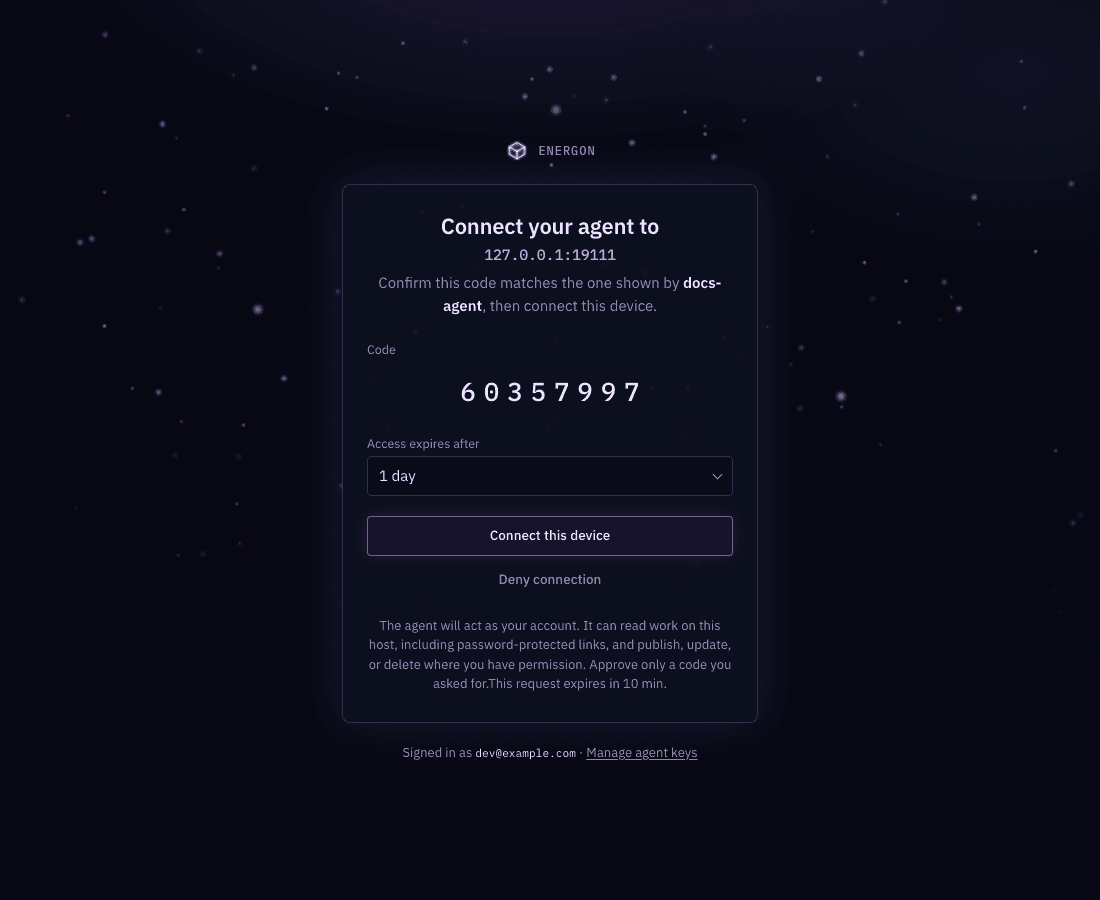
The agent key is delivered once to the waiting agent. It saves the token before using it, sets the host-advertised environment variable for this session, and persists it for future sessions. Prefer the environment’s credential store; otherwise use a user-level environment file, shell profile, or file under your home directory, outside the project. Files holding the secret must be readable only by you (mode 600 on Unix, in a directory other users cannot read).
The agent reports where it saved the credential, its label, and expiration without showing the token. If the environment discards all files after the session, the agent should say that another session needs a new approval or a provisioned credential. It must not repeatedly request connections to work around missing persistence. You can revoke the token from /keys.
Approve only a connection you requested. The agent must not automate approval, request your sign-in credentials, or paste its polling credential or agent key into chat. Denial ends the request.
3. Verify the account
Ask the agent to call /v1/whoami and report the account, token label, and expiration without revealing the token. For a manual check, use your real hub origin and advertised environment name:
curl -fsS "$HUB_ORIGIN/v1/whoami" \
  -H "Authorization: Bearer $EXAMPLE_COMPANY_ENERGON_TOKEN"
Check that the account and Energon are the ones you intended. expires_at: null means no scheduled token expiry; revocation still applies. scope is account or admin. You can now publish your first document.
Alternative: create a key by hand
For CI, scheduled jobs, a hosted sandbox with a secret store, or a host without connection requests, sign in at /keys. The Agent keys page lists active keys first. Under Create a key by hand, choose a label and lifetime, select Create key, and copy the secret immediately; it is shown only once. Configure it in the environment’s secret store using the name from /setup or /v1/help.
export EXAMPLE_COMPANY_ENERGON_TOKEN='PASTE_ONE_TIME_KEY_HERE'Replace the example environment name with the host’s value. Paste the secret only into your own terminal or secret store, never a chat, tracked file, or published document. Verify with /v1/whoami as above.
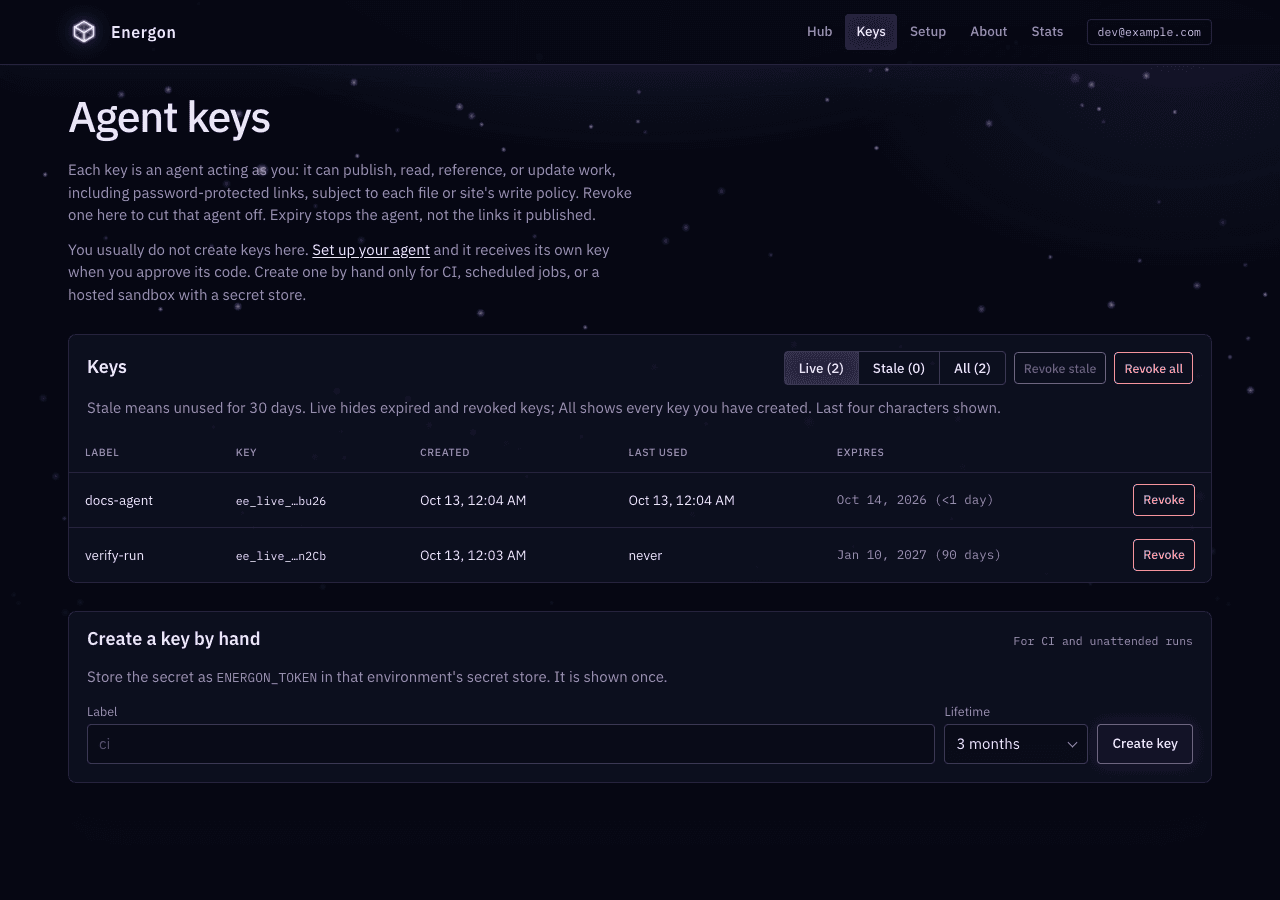
Live keys unused for 30 days show a Stale badge. Revoke stale and Revoke all preview a count, then ask you to type that count. To revoke one key, select Revoke next to it, type its exact label, and confirm. Revocation cuts off that credential; it does not delete the links it published. When a task is done and nothing else will reuse the key, the agent can DELETE /v1/whoami. Do not revoke a key stored for CI.
Pitfalls and recovery
Reopening an ended approval link shows an explanation without an approval form. An already-approved request asks you to return to the agent (HTTP 409); a denied request returns 403. Expired, missing, or already-consumed requests return 410 and ask for a new request. These human-readable pages do not change the agent polling protocol. Do not interpret reopening an old link as a fresh approval.
- Denied connection: stop. Ask the human before starting another request.
- Expired request: start a new connection only when the human is ready to approve. If token delivery was lost or already consumed, have the human revoke that token before approving another connection.
- Expired or revoked token: stop using it. Ask the human to approve a new connection or create a replacement key; existing tokens cannot be refreshed or extended.
- Wrong skill or host: return to the intended host’s
/setupor/v1/helpand correct the installation. Do not substitute another Energon.
Choose the right Energon for each repository
Keep multiple Energon skills side by side when their names and token environments differ. For example, an agent may have personal-energon for personal projects and acme-energon for work owned by Acme. Name the intended skill when the context is not already clear:
Publish the plan for review on acme-energon.For a repository that should consistently use one Energon, record both the skill and the hub origin in AGENTS.md, CLAUDE.md, or the equivalent project instructions:
## Energon

Use `/acme-energon` for Energon handoffs in this repository.
Energon hub: https://energon.acme.example

If the skill is unavailable, read https://energon.acme.example/v1/help
or https://energon.acme.example/llms.txt and use the documented API.
Do not substitute another Energon.
The skill is the normal interface, not a requirement for service access. An agent without it can still discover this Energon through /v1/help, read the operating guidance in /llms.txt, and use /v1 with a token obtained through human approval or manual minting. It must not invent a token, guess another host, or silently fall back to a different Energon.
Keeping these Energons explicit is safer than changing one global token variable to point at whichever host you used last. If someone only needs to replace bytes at one public URL, give them a write password instead of connecting them; see Let an outside agent update a URL. If a machine without a token needs to upload one file itself, including a new file, mint it a single-use grant; see Let a machine upload without a token. Read Core concepts for the hub/content split and Safe boundaries before deciding where to persist a token.