Create, revise, copy, find, and delete published work while keeping the links your collaborators already hold. Preserve identity because a new site id or file id creates another artifact instead of updating the first. This guide covers that full working lifecycle for sites and loose files, from initial publication through permanent deletion.
Manage shared work
Manage work in the browser
Open the hub and use Your work, Created by you, or Last edited by you to choose the catalog view. Sites and files share one Catalog list; a glyph before each name says which it is, and All, Sites, or Files narrows the list by kind. Search matches slugs and filenames, not document contents. Sort by Updated, Name, Size, Oldest, or Last read, and select Load more when another page is available. Last read puts never-read work first. More filters opens Expiry (Any, Never, 24h, or 7d), Expires before, Last written before, Minimum size, and Last open; 24h and 7d show work that expires within that window, and choosing one clears and disables Expires before. Changed since last open under Last open shows work updated after its last recorded read, including work never read; loose-file reads can lag by about a day. The toggle shows how many of those are active while it is collapsed, and the panel opens on load when the URL already carries one. These controls filter work you created or last edited, not every object on this Energon. The hub has no last-read cutoff filter.
Date filters accept a date such as 2026-01-01 or an ISO timestamp. Minimum size accepts bytes or units such as 500kb, 1mb, and 2gb. Invalid values show a field error and stop the catalog refresh until corrected. A failed catalog load offers Try again; messages can be dismissed.
Each row shows the name, Updated, Last read, Expires, and Size, then Copy URL and More actions. The Expires badge turns red within 24 hours and amber within seven days. The menu names the kind, the write policy, the last writer, and the last read, then offers download, duplication, Change expiration, Set password or Change or remove password (the Link access dialog), and deletion; Who can write appears only for the creator. A site with files offers Download zip. Catalog rows show an unboxed lock (View password) when only a share password is set, a lock-and-pencil lockup (Write password) when a write password is set, and no password mark when neither door is on. A private row shows a Private key mark instead, its name is not a link because the public URL refuses browsers, and More actions offers Link access in place of Set password and no Who can write. A write-password row uses the lockup alone, not a lock beside it, and there is no Password chip. Hovering or focusing a row icon shows its name. Expiry stays blank when the work does not expire; unlimited work is not labeled Never. Last read reads None when the Worker has not served the bytes. On smaller screens, rows collapse to the name and one line of details, and More actions holds the controls that no longer fit.
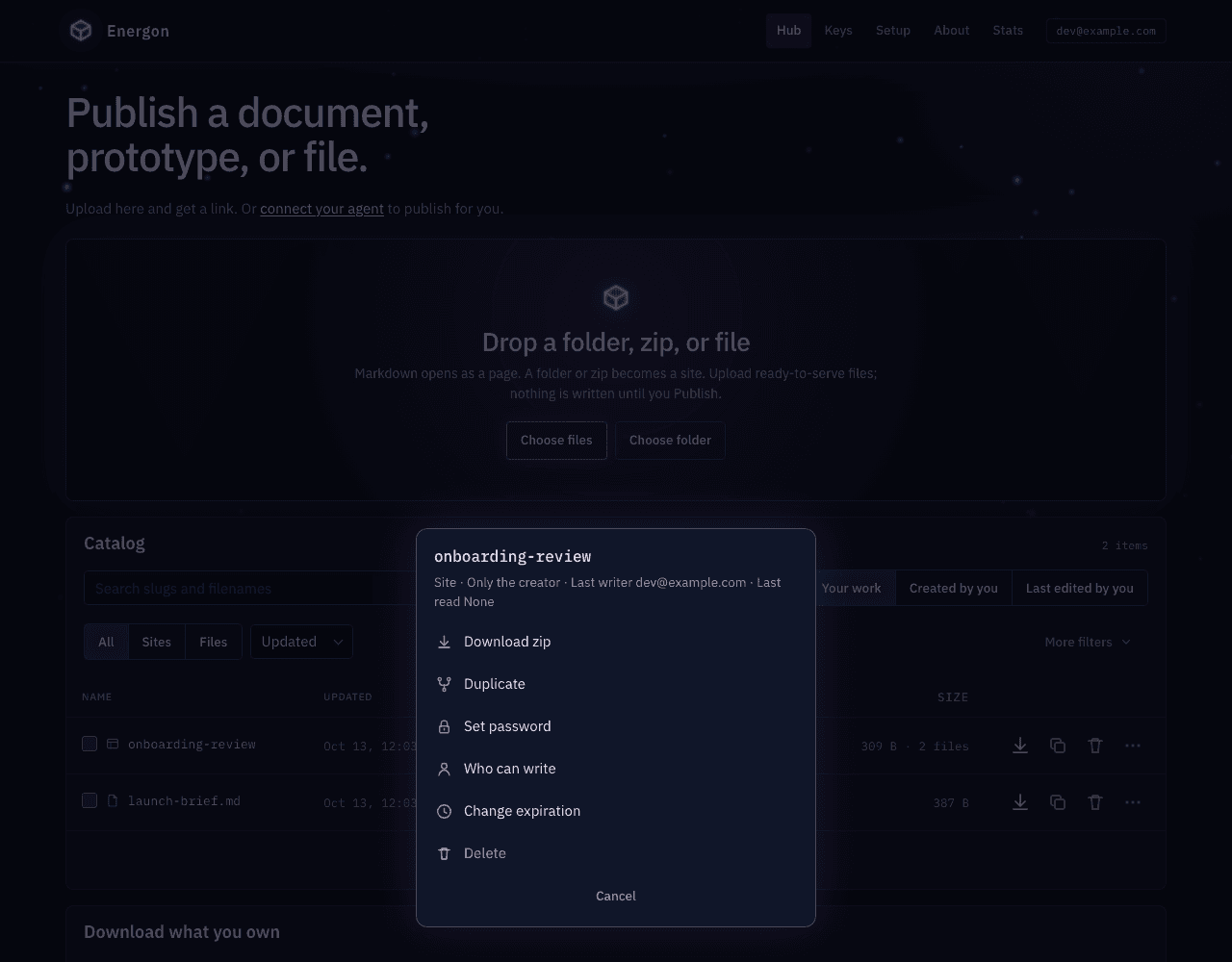
Duplicate creates an independent copy. For a site, choose a new slug in the dialog. The copy gets a new id. Change expiration opens a dialog whose timer starts now. Set password opens Link access. Its Who can open control switches between Anyone with the link and Only you and your agents; only the creator can change it, and the password doors appear only while the link is open to anyone. Each door has an Off/On control; the phrase, generate, and copy controls appear only when that door is On. Off and Save removes it. Emptying the field is not how you clear a password. If the dialog cannot load the stored phrases, the doors stay disabled so Save cannot rotate or clear a live hash. The Hub keeps recoverable phrases for the creator so they can copy them again. Last writers see a read-only note instead of the owner’s phrase. /v1 GET never returns the phrases. Hash-only rows created before recoverable storage cannot show the old phrase; generate a new one or turn the door Off. After a guest write, Last writer stays the last account and the row shows Updated via shared write. Delete requires typing the exact slug or filename and removes the object permanently.
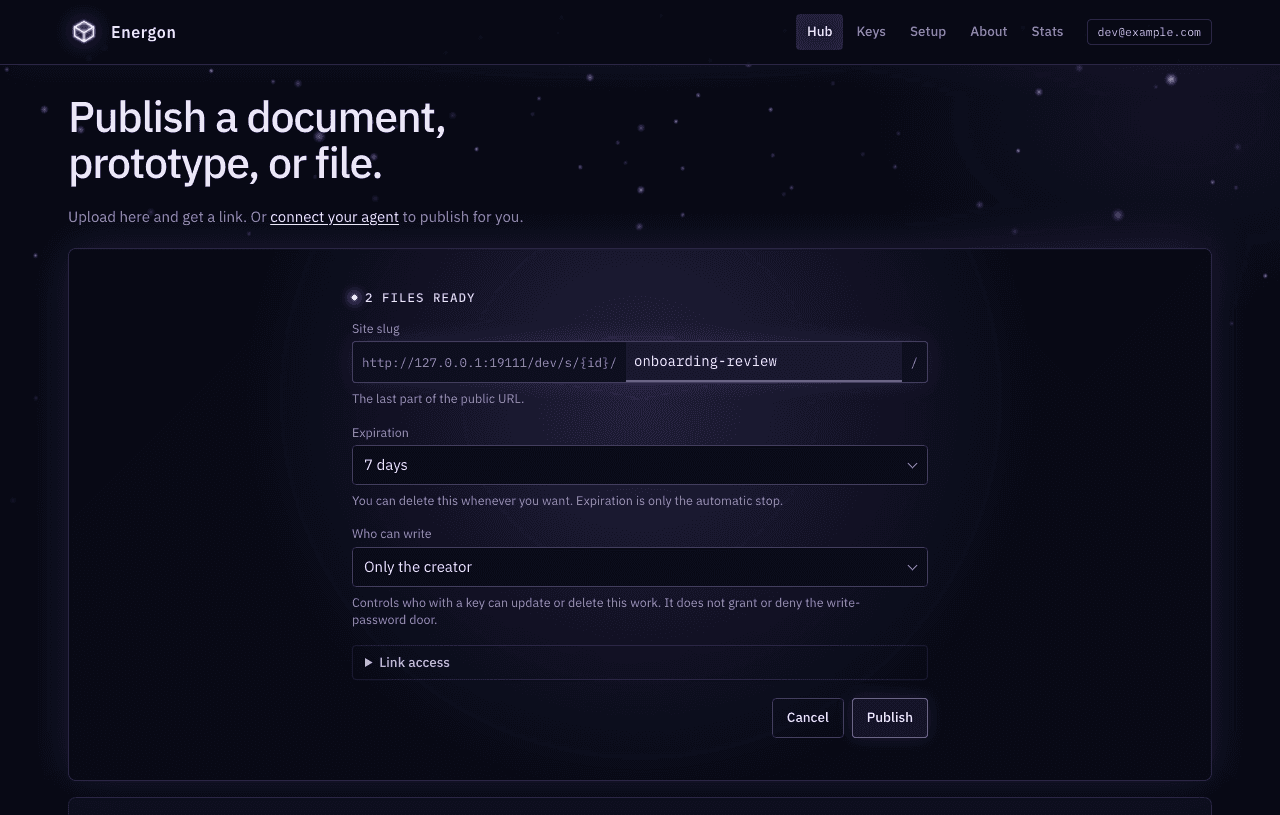
To publish a site, choose Choose folder, or select a ZIP with Choose files. Use prepared output with index.html and its assets; Energon does not build your project. Review Site slug, the last part of the staged public URL, plus expiration and write policy. Share and write passwords sit behind the closed Link access disclosure, which opens when either door is on. The same disclosure holds Who can open: choose Only you and your agents to publish privately, which hides the password fields and fixes Who can write to Only the creator. Then select Publish. Every publish mints a new site id. A repeated slug is another site, not an update. To change an existing site, use the catalog row or the API id.
Follow, retry, resume, or cancel a site publication
The hub publishes a folder as one deployment: nothing in the folder becomes public until every file has uploaded and the hub commits them together. The status line above the form reports progress, such as Checking files, Uploading files: 3 of 12, Preparing files, and Publishing. A selected ZIP uploads once, then prepares and commits the same way.
If an upload fails partway, the hub keeps the selected files and shows Retry publication. The new site already exists at that point, so the slug, expiration, write policy, and passwords are locked; retry continues the same site with the same settings and skips files that already uploaded. The uploaded files stay private until commit. Selecting Cancel here clears the form, but the empty site remains in your catalog until you delete it.
Once every file, or the ZIP, is stored, the hub remembers the publication in this browser tab. If the commit is interrupted or you reload the page, the card shows Resume publication and Cancel publication instead of the drop zone. Resume finishes preparation and commit, or reports the existing result if the commit already succeeded. Cancel discards the unpublished upload; the site’s published content does not change. The hub cannot resume from another tab or after the upload session’s one-hour lifetime ends. On success, the message reads Published followed by the site link, or Published privately with no link for a private site.
Download what you own zips every site and loose file keyed to this account, including private ones, not work you only edited. Use it before a bulk cleanup. The same size and file-count caps as a site export apply. The card appears once the catalog has something in it.
To retire many of your own objects, check rows, or filter the catalog and select Select all matching these filters under the list. A bar fixed to the bottom of the window shows the count. Choose Set expiry, Expire soon, or Delete, then press that verb. One dialog shows the matched and eligible counts, the storage involved, a sample of names, and a field for typing the count to confirm. Expire soon sets a 30-minute grace. Set expiry is the safe default. Delete has no recycle bin. If the selection changed since the dialog opened, it says so and you confirm again. Hub cleanup never uses a last-read cutoff. From v1.15.0, Select all matching these filters is disabled, with a note under it, while Changed since last open is on, because cleanup has no matching filter and would reach rows the list hides. Check rows or use Select visible instead.
To revise a loose file at its existing URL, use an agent or the API. A new upload in the hub creates another file. The following procedures explain those API operations and their identity rules.
Preserve identity across revisions
Energon addresses a site by generated id and a loose file by generated id. The slug and filename on public URLs are readable labels. Decide whether you are creating or revising before sending bytes, then preserve the response fields needed for the next mutation.
Replace the placeholder hub before running the examples. ENERGON_TOKEN must be a valid token issued by that Energon through human approval or manual minting.
export ENERGON_ORIGIN="https://hub.your-company.example"
test -n "$ENERGON_TOKEN" || { echo "Set a human-authorized ENERGON_TOKEN" >&2; exit 1; }
AUTH_HEADER="Authorization: Bearer $ENERGON_TOKEN"
Create and fill a site
Create the catalog identity first. Use a short lowercase slug as the label, choose a TTL supported by GET /v1/help, and choose owner or org explicitly when this Energon’s default is not what you want.
SITE_JSON=$(curl -fsS "$ENERGON_ORIGIN/v1/sites" \
  -H "$AUTH_HEADER" \
  -H "Content-Type: application/json" \
  --data '{"slug":"onboarding-review","ttl":"7d","write_policy":"owner"}')

SITE_ID=$(printf '%s' "$SITE_JSON" | jq -r .id)
SITE_URL=$(printf '%s' "$SITE_JSON" | jq -r .url)

curl -fsS "$ENERGON_ORIGIN/v1/sites/$SITE_ID/files/index.html" \
  -X PUT \
  -H "$AUTH_HEADER" \
  -H "Content-Type: text/html" \
  --data-binary @dist/index.html

curl -fsS "$SITE_URL"
Each PUT publishes a new complete version of the site that changes only its path and keeps every sibling path. It does not extend the site’s expiry. A new path returns 201; replacing an existing path returns 200. If another write changes the site at the same moment, the PUT can return 409 site_busy; read the site again before retrying. The same slug on another POST mints another site with a new id.
PUT one path at a time only for small edits. For a release that changes several files, such as HTML with its CSS and JavaScript, use Publish a complete site update so readers never see a mix of old and new files. Each path PUT copies the full site into a new version, so a series of PUTs also uses more temporary storage than one deployment.
Update metadata without replacing bytes
PATCH changes the share password, write password, content lifetime, write policy, or link access. The only accepted write-policy values are owner and org; only the creator may change that policy, the write password, or link_access.
curl -fsS "$ENERGON_ORIGIN/v1/sites/$SITE_ID" \
  -X PATCH \
  -H "$AUTH_HEADER" \
  -H "Content-Type: application/json" \
  --data '{"ttl":"30d","write_policy":"org"}'
Set password to a new phrase to protect the public content URL, or to an empty string to clear protection. Set write_password the same way for guest PUT. When the request includes either field, the response echoes the new phrase once or returns null after a clear; later GET and list responses expose only password_protected and write_password_protected. The Hub can show the phrases again to the involved signed-in human.
Set link_access to private to close the public URL and limit the object to your own account’s keys. A private object cannot keep either password, so send "password": "" and "write_password": "" in the same PATCH or the request is 409 link_access_conflict. Keep work private to your account covers the rules.
After a guest write, last writer stays the last account and the Hub shows Updated via shared write. Catalog involvement does not change, because guest writes do not rewrite parent last_written_by.
Import and export a site
Import merges a ZIP into an existing site. It strips one common wrapping directory and replaces only paths present in the archive; unrelated existing paths remain. The merged result publishes in one commit, so readers never see half of an archive. Import rejects unsafe archive paths and enforces a 200-file limit on the merged site. By default the ZIP can be up to 100 MiB (limits.zip_import_bytes) and can expand to 500 MiB (limits.zip_extracted_bytes); each file inside must also fit the per-file limit. To replace the whole site and drop paths the archive omits, use a ZIP deployment instead.
curl -fsS "$ENERGON_ORIGIN/v1/sites/$SITE_ID/import" \
  -X POST \
  -H "$AUTH_HEADER" \
  -H "Content-Type: application/zip" \
  --data-binary @site-build.zip

curl -fsS "$ENERGON_ORIGIN/v1/sites/$SITE_ID/export" \
  -H "$AUTH_HEADER" \
  -o onboarding-review.zip
The plain import call returns 200 with the written paths once the merge is published. For a large archive, add Prefer: respond-async so preparation runs in bounded, resumable steps instead of one request. Also send an Idempotency-Key header (Unix milliseconds, a dot, and a UUIDv4) so a lost response can be retried safely. The response is 202 with a session status_url. Then prepare until ready and explicitly commit it, exactly like a deployment. That session still merges.
Export requires at least one site file. It returns a ZIP attachment and uses token authorization, so a site’s public share password is not involved. Export has its own cap, 25 MiB by default (limits.zip_export_bytes), which is smaller than the import cap. For a larger site, read the file listing and GET each path; those are independent reads, not one pinned version.
To download everything this account owns, use GET /v1/export or the hub card Download what you own, which appears once the catalog has something in it. Its manifest.json records each object’s link_access; a private object is included, and its listed url answers 403 link_private.
Duplicate instead of downloading and re-uploading
Server-side duplication copies stored bytes to a new identity. The caller owns the copy. Source share password, write password, TTL, write policy, and link access are not inherited, so a copy of a private object is public unless the request sends link_access: "private"; the destination uses fields on the copy request or current Energon defaults.
curl -fsS "$ENERGON_ORIGIN/v1/sites" \
  -H "$AUTH_HEADER" \
  -H "Content-Type: application/json" \
  --data "{\"slug\":\"onboarding-review-v2\",\"duplicate_from\":\"$SITE_ID\",\"ttl\":\"7d\",\"write_policy\":\"owner\"}"
A copy must have a new slug and receives a new id.
Create and revise a loose file
Use POST only for the first version. Save the returned id, public content URL (url), and authenticated API URL (api_url), then PUT the id for every revision.
FILE_JSON=$(curl -fsS "$ENERGON_ORIGIN/v1/files" \
  -H "$AUTH_HEADER" \
  -H "X-Filename: decision.md" \
  -H "X-Energon-TTL: 7d" \
  -H "X-Energon-Write-Policy: owner" \
  -H "Content-Type: text/markdown" \
  --data-binary @decision.md)

FILE_ID=$(printf '%s' "$FILE_JSON" | jq -r .id)
FILE_URL=$(printf '%s' "$FILE_JSON" | jq -r .url)

curl -fsS "$ENERGON_ORIGIN/v1/files/$FILE_ID" \
  -X PUT \
  -H "$AUTH_HEADER" \
  -H "Content-Type: text/markdown" \
  --data-binary @decision.md
PUT keeps the id and does not move expiry. It returns the current canonical url and api_url.
409 file_busy means another write to that file is in progress; retry shortly. From v1.11.0, 409 file_recovery_required means an earlier interrupted write left the file’s storage unreconciled. Retrying cannot clear it, so stop and ask an administrator to reconcile it from Admin Health. Reads keep working in the meantime.
Replace only if nobody else has
From v1.11.0, when more than one person or agent revises the same file, make the replacement conditional so it never overwrites newer work. Every loose file carries a content_generation counter. It starts at 1 and goes up by one on every byte replacement; a PATCH of the password, TTL, or write policy leaves it unchanged. Read it at the same time as the bytes you are about to edit:
GENERATION=$(curl -fsS -D - -o decision.md "$ENERGON_ORIGIN/v1/files/$FILE_ID" \
  -H "$AUTH_HEADER" | awk -F': ' 'tolower($1)=="x-energon-content-generation" {print $2+0}')

# Edit decision.md, then send the generation back.
curl -fsS "$ENERGON_ORIGIN/v1/files/$FILE_ID" \
  -X PUT \
  -H "$AUTH_HEADER" \
  -H "X-Energon-Expected-Version: $GENERATION" \
  -H "Content-Type: text/markdown" \
  --data-binary @decision.md
The generation also appears as content_generation in create, replace, PATCH, and list responses, and as the X-Energon-Content-Generation header on public file reads. A multipart PUT can send it as the expected_version field instead; the header wins when both are present.
If someone replaced the file after you read it, the PUT returns 409 file_conflict with the current content_generation and changes nothing. Read the file again, merge your edit with theirs, and PUT with the new generation. Do not resend the same bytes without the header to force them through. A file blocked on storage recovery answers 409 file_recovery_required even when your generation is stale. Without the header, PUT replaces unconditionally, as before.
The counter is not a digest: restoring earlier bytes still counts as a new generation. Site path writes and imports are not conditional and reject the header with 400 bad_expected_version. For a conditional site update, use a site deployment with expected_version.
Rename a loose file
Rename and replace happen in one PUT. PATCH does not accept a filename.
RENAMED_JSON=$(curl -fsS "$ENERGON_ORIGIN/v1/files/$FILE_ID" \
  -X PUT \
  -H "$AUTH_HEADER" \
  -H "X-Filename: final-decision.md" \
  -H "Content-Type: text/markdown" \
  --data-binary @decision.md)

FILE_URL=$(printf '%s' "$RENAMED_JSON" | jq -r .url)
The id stays stable, but the readable filename segment changes. Old public filename paths redirect to the new canonical URL, so refresh any displayed link from the returned url.
Duplicate a loose file
curl -fsS "$ENERGON_ORIGIN/v1/files" \
  -H "$AUTH_HEADER" \
  -H "Content-Type: application/json" \
  --data "{\"duplicate_from\":\"$FILE_ID\",\"filename\":\"decision-copy.md\",\"ttl\":\"7d\",\"write_policy\":\"owner\"}"
The copy receives a new id. To upload JSON as literal file bytes instead, include X-Filename; Energon then treats the JSON body as content rather than a duplication request.
From v1.14.0, POST /v1/files/{id}/duplicate does the same copy with the source id in the path and only JSON options in the body, so it can never be mistaken for an upload:
curl -fsS "$ENERGON_ORIGIN/v1/files/$FILE_ID/duplicate" \
  -H "$AUTH_HEADER" \
  -H "Content-Type: application/json" \
  --data '{"filename":"decision-copy.md","ttl":"7d","write_policy":"owner"}'
Tool gateways expose this route as files.duplicateFile.
Keep a fixed link for each release
A stable URL always serves current contents. Energon keeps no revision history, and a page’s later asset requests can land after another commit. When people need a link that keeps showing exactly what was published, such as a release, a deliverable cited later, or a page someone keeps open while you work, publish each release as its own site or file instead of revising one in place.
- Start the new release from the previous one with
duplicate_from(shown above), then change what differs. - Set
write_policytoownerso others cannot change that copy. - Set a TTL on each copy so old releases expire.
- For one link that always shows the newest release, keep a small pointer site whose
index.htmlredirects to the latest copy. Update only the pointer when you publish.
The pointer has costs. The reader’s address bar ends on the copy’s URL, and a password-protected copy prompts for its password after the redirect. Energon does not record which copy came from which, so keep that list yourself.
Publish Markdown for both people and agents
Browsers requesting HTML see sanitized rendered Markdown. Agents and curl receive source by default. The query string makes the choice explicit:
curl -fsS "$FILE_URL?raw=1" -o decision.md
curl -fsS "$FILE_URL?download=1" -o final-decision.md
curl -fsS "$ENERGON_ORIGIN/v1/files/$FILE_ID" \
  -H "$AUTH_HEADER" \
  -o decision.md
For a site root, index.html wins, then index.md, then the generated file list. An authenticated API GET always returns the stored bytes rather than rendered HTML.
Find work you touched
Lists are involvement views, not an Energon-wide catalog. The default includes objects your account created or your email last wrote. Use scope=created for originals, scope=edited for other people’s objects you changed, and created_by when you know the original author.
PAGE=$(curl -fsS \
  "$ENERGON_ORIGIN/v1/sites?scope=involved&q=onboarding&sort=updated&limit=25" \
  -H "$AUTH_HEADER")

printf '%s' "$PAGE" | jq '{total, next_cursor, sites}'

NEXT=$(printf '%s' "$PAGE" | jq -r '.next_cursor // empty')
if test -n "$NEXT"; then
  curl -fsS -G "$ENERGON_ORIGIN/v1/sites" \
    -H "$AUTH_HEADER" \
    --data-urlencode "scope=involved" \
    --data-urlencode "q=onboarding" \
    --data-urlencode "sort=updated" \
    --data-urlencode "limit=25" \
    --data-urlencode "cursor=$NEXT"
fi
q searches site slugs or loose filenames, never file contents. sort is updated, name, size, age, or last_read. limit defaults to 25 and is clamped to 1–50. Pass the opaque next_cursor back as cursor without parsing it. Add expires=never, expires_before, expires_within=24h or 7d, updated_before, and min_size to find cleanup candidates. changed_since_read=1 lists work updated since it was last read; it is a list filter only, not a cleanup target. Hub cleanup uses those same filters and never a last-read cutoff. Then preview with POST /v1/cleanup and execute only after showing the human the confirm hash.
PREVIEW=$(curl -fsS "$ENERGON_ORIGIN/v1/cleanup" \
  -X POST \
  -H "$AUTH_HEADER" \
  -H "Content-Type: application/json" \
  --data '{"target":{"expires":"never","kind":"files"},"action":"set_ttl","ttl":"7d"}')

printf '%s' "$PREVIEW" | jq '{matched, eligible, bytes, skipped, sample, confirm}'
CONFIRM=$(printf '%s' "$PREVIEW" | jq -r .confirm)

curl -fsS "$ENERGON_ORIGIN/v1/cleanup" \
  -X POST \
  -H "$AUTH_HEADER" \
  -H "Content-Type: application/json" \
  --data "{\"target\":{\"expires\":\"never\",\"kind\":\"files\"},\"action\":\"set_ttl\",\"ttl\":\"7d\",\"confirm\":\"$CONFIRM\"}"
Delete only after proving the target
Read the object detail or public content URL immediately before deletion. A site delete removes every path. A path delete removes one path. A loose-file delete removes the object. None has a recycle bin.
# Prove the loose-file identity first.
curl -fsS "$ENERGON_ORIGIN/v1/files?scope=involved&q=final-decision.md" \
  -H "$AUTH_HEADER" | jq '.files[] | {id, filename, url}'

# Replace FILE_ID only after checking the listing.
curl -fsS "$ENERGON_ORIGIN/v1/files/$FILE_ID" \
  -X DELETE \
  -H "$AUTH_HEADER"
For a site path, use DELETE /v1/sites/{id}/files/{path}. For the whole site, use DELETE /v1/sites/{id}.
Common mistakes
Do not invent a token or reconstruct a public hostname. Use a human-authorized token from this Energon, follow the returned url, id, and api_url, and treat a repeated slug as a new site. Deletion is permanent, and PUT never extends expiry.
Verify the recipient’s view
After every mutation, fetch the returned public content URL in url for a human handoff or GET the authenticated API URL in api_url for a loose-file agent handoff. Authenticated site routes are keyed by id. Give a recipient the returned public path URL and any share password. The write response confirms acceptance; the follow-up read checks the exact artifact the recipient will use.
For exact payload and response fields, use the HTTP API reference. For the difference between public-reader passwords, guest write passwords, and writer authorization, read Sharing, access, and expiry. To hand a public URL to someone outside the host, follow Let an outside agent update a URL. If the agent is not connected yet, start with Connect an agent.